


Apple's undocumented update to macOS Tahoe 26.4 now intercepts your Terminal paste and asks: 'Are you sure you want to run whatever the internet just told you to?'
The new mechanism delays execution of a pasted command and shows an alert that scammers often distribute malicious instructions through various channels. Users can back out or proceed, but Apple has not published an official support document explaining how the system judges risk.
ClickFix attacks trick users into pasting malicious commands under the guise of troubleshooting. Because the user initiates the paste, traditional security controls are bypassed. Apple's countermeasure appears to trigger only once per session and may analyze command content, as innocuous lines do not raise the warning.
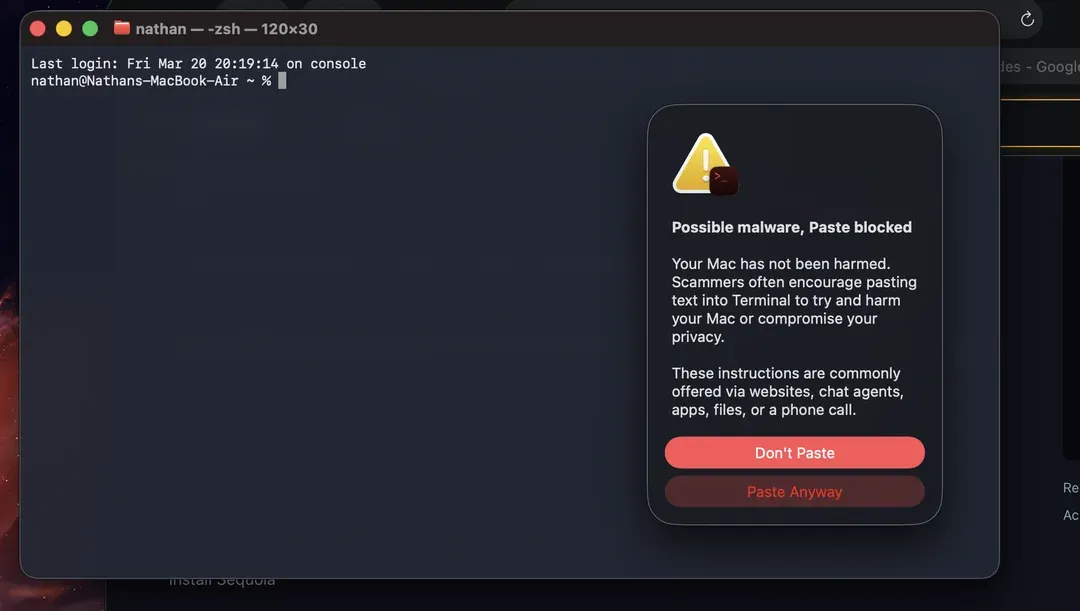
Based on user reports, the alert appears when copying commands from Safari into Terminal. One tester repeatedly pasted sudo rm -rf / and saw the warning only on the first attempt. Another noted that harmless commands never triggered the dialog.
Looks like it only warns you once. I tried multiple copy and pastes from different sites after the initial alert and never saw it again.
— Mr. Macintosh (@ClassicII_MrMac) March 25, 2026
*Do not run the command below. 😅
I filed feedback on this specific command to ask Apple for an additional warning for users. pic.twitter.com/Tfua5ECCZ5
Apple did not mention the feature in the macOS Tahoe 26.4 release notes, and the company has not responded to requests for clarification. Until documentation arrives, users should not rely solely on the alert; the safest defense remains refusing to execute any command you do not fully understand.