1Password’s New Phishing Warning: A Nudge, Not a Lock
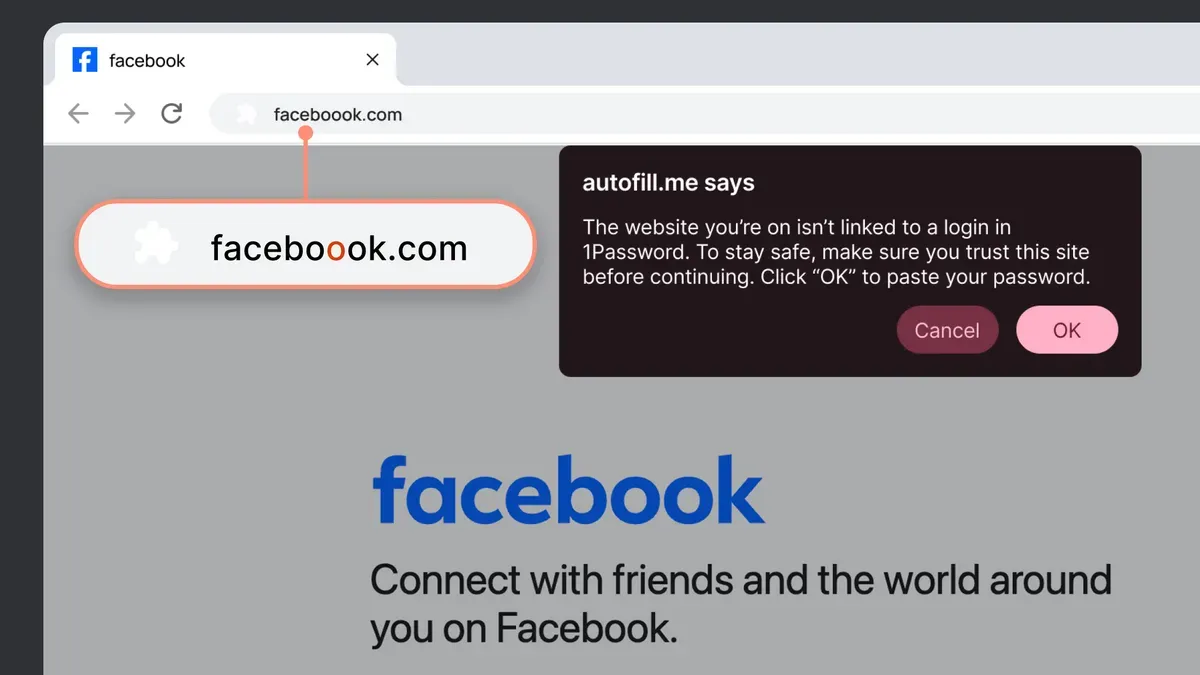
1Password’s new phishing warning feature won’t stop scammers, but it might make you think twice before logging in. The tool blocks autofill and displays warnings when a site’s URL doesn’t match the one stored in your password manager. This is distinct from browser extensions or email filters, which often rely on blacklists or heuristic analysis to flag suspicious links.
When you attempt to log in to a site, 1Password compares the current URL to the one associated with your saved credentials. If there’s a mismatch—such as a typo-squatted domain or a fake login page—it interrupts the autofill process and shows a warning. Users can still manually enter their credentials, but the delay forces a moment of hesitation that might prevent a mistake.
IBM research highlights the stakes: phishing attacks cost businesses an average of $4.8 million annually. 1Password’s approach aims to reduce these losses by making users more vigilant. However, the feature is enabled by default only for individual and family plans. Business users must manually activate it, and the rollout will take weeks to reach all accounts.
This delayed activation reflects the tool’s limitations. It’s not a foolproof defense but a user-awareness mechanism. As with any security measure, it works best when combined with education and other protections. The rollout begins immediately but may take weeks to reach all users.